
Rosie-Fancy AI Chatbot
BLACK ENERGY GROUPEntertainment
4.5699.00 Reviews
- Version
- 1.0.7
- Installs
- 500.00K
- Age Rating
- Mature 17+
Screenshots
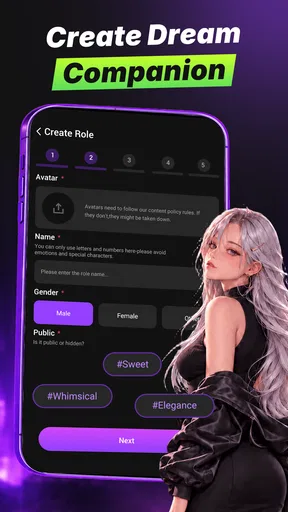
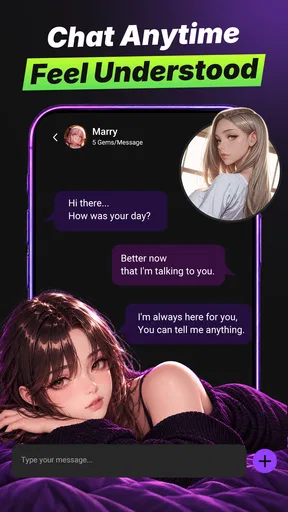


Our Review of Rosie-Fancy AI Chatbot
 Analysis by Appyee
I approached Rosie-Fancy as an entertainment app built around conversational company rather than a conventional game, media player, or social network. Its central idea is simple: open a chat and spend time with an AI personality that can keep things playful, flirty, or imaginative. In practice, the appeal depends less on a long feature list and more on how naturally the conversation fits into small gaps in the day.
My first impression was that this is best understood as a private, prompt-driven chat experience. You decide whether you want light banter, a creative scenario, a little role-play, or a more personal exchange. That flexibility gives it a different rhythm from scrolling through videos or waiting for another person to reply. At the same time, it means the quality of each session depends heavily on what you ask for and how clearly you guide the conversation.
Rosie-Fancy is developed by BLACK ENERGY GROUP and sits in the entertainment category. It is free to install, carries a Mature 17+ rating, and has reached more than half a million installs with an average rating of 4.5 from roughly ten thousand ratings. Those figures suggest that the concept has found a substantial audience, but they do not change the basic truth I noticed while using it: this is a focused experience for people who specifically want AI conversation, not an all-purpose entertainment hub.
How the chat feels when the network is doing the work
Connectivity is not a background detail here; it shapes the entire experience. Rosie-Fancy needs an active connection for the conversation to function as intended, so the quality of your network affects how quickly the exchange feels alive. On a reliable connection, the experience is easy to slip into. I can send a thought, wait for the response, and continue without having to manage much else.
That makes the app particularly suitable for short sessions at home, during a quiet break, or while waiting somewhere with dependable mobile data. The conversational format does not require a large screen or a complicated setup. I can use it in portrait orientation, type a few lines, and leave when I have had enough. The low commitment is one of its strongest practical qualities.
The network requirement also changes how I think about the app compared with a downloaded puzzle or a locally stored video. With those alternatives, a weak signal may not matter. Here, it can interrupt the central activity itself. A delayed response is not merely a minor loading inconvenience; it breaks the feeling that I am having a continuous exchange. If conversational flow matters to you, a stable connection is part of the experience rather than an optional convenience.
I found that the best results came from treating each session as a guided conversation instead of sending isolated one-word prompts. A request such as “tell me something fun” leaves a lot of room for a generic answer. A more specific instruction, such as asking for a playful scenario with a particular mood and setting, gives the chatbot a clearer direction. This is an important practical tip because the app’s flexibility can otherwise feel like vagueness.
Why short, specific prompts work better
One useful workflow is to establish the tone at the beginning of a session. I might say that I want a relaxed conversation, a teasing exchange, or an imaginative story, then correct the direction if the response feels too broad. This reduces the need to restart repeatedly. It also makes the app feel more personal without requiring me to write a long prompt every time.
Another helpful habit is to use follow-up questions that refer directly to the previous response. Instead of jumping from topic to topic, I can ask the chatbot to expand a detail, change the mood, or continue a scene. That creates more continuity than treating every message as a new request. For users who want creative companionship, this is more satisfying than simply collecting disconnected answers.
There is a trade-off, though. The app can be imaginative, but it is not a replacement for a human relationship or a guaranteed source of emotional understanding. A chatbot can respond in a warm or flirtatious style while still missing the nuance behind what I mean. I would use it for entertainment and private exploration, not as the only place to seek serious emotional support or important advice.
Using it in real mobile situations
A realistic scenario is a short evening break after work or study. I can open the app, choose a conversational direction, and spend a few minutes building a playful exchange. If I am in a public place, I would keep the session discreet and use headphones only if the device produces any sound. The mature rating makes this especially important: the app is not aimed at children, and I would not hand it to a younger family member as a casual chat toy.
It also works for creative warm-ups. Before writing a scene, I can ask for a fictional premise, develop a character interaction, and then use the exchange to discover a direction of my own. The chatbot is more useful in this role when I treat its replies as material to react to rather than finished writing. That approach keeps me in control and avoids expecting every answer to be polished or original enough to use unchanged.
On a commute, the experience depends on the route. A strong connection can make it a convenient way to fill a few minutes, but a patchy signal can turn the same journey into a series of pauses. I would not begin an important or immersive conversation just before entering a tunnel, boarding an underground train, or moving through an area where mobile service is unreliable. Rosie-Fancy is better for flexible downtime than for a situation where interruption would be frustrating.
The phone itself matters as well. Typing long prompts on a small screen can become tiring, especially when I am trying to describe a detailed scenario. Shorter exchanges are more comfortable, while extended role-play benefits from a place where I can sit and focus. This is one reason I see the app as a companion for brief, repeatable sessions rather than an experience I would leave open for hours.
What happens when the connection fails
The most noticeable weakness is the lack of control when the network becomes unstable. If a message takes too long to move through, the conversational mood fades quickly. I may wonder whether the prompt was sent, whether the response is still being generated, or whether I should try again. Repeating the message without checking can create confusion if both attempts eventually arrive.
My practical advice is to pause before resending. When a response does not appear promptly, I would first check the connection, avoid tapping repeatedly, and then reopen or refresh the conversation only if necessary. This is not a sophisticated recovery system; it is simply a way to prevent a temporary network problem from turning into duplicate messages or a disjointed exchange.
Recovery is easier when I keep expectations modest. I would not compose a long, carefully structured prompt while connected to uncertain mobile data. A shorter message is less annoying to repeat, and I can return to the main idea after the connection stabilizes. For a service centered on live AI replies, this small adjustment makes a real difference to how much friction I feel.
There is also a psychological side to failed connectivity. The app’s appeal comes from immediate responsiveness, so a delay can make the chatbot seem less engaging even when the underlying conversation would otherwise be enjoyable. This is different from a static entertainment app, where a loading pause may be easy to ignore. Here, the pause is part of the interaction and therefore more visible.
Keeping conversations coherent after interruptions
If a session is interrupted, I would restart with a brief reminder rather than assuming the previous direction will always be obvious. A sentence explaining the mood or scenario helps me regain control. This is especially useful after switching networks, moving from Wi-Fi to mobile data, or reopening the app after leaving it in the background.
I also prefer to separate experimental prompts from conversations I genuinely want to continue. Trying an unusual idea is fun, but mixing several unrelated directions can make the exchange feel scattered. A clear beginning, a defined tone, and occasional corrections produce a more coherent result. That workflow is not advertised as a feature, but it is the difference between a satisfying session and a string of generic replies.
Users who expect flawless memory across every interaction should approach carefully. The experience feels better when I actively steer it instead of assuming it will understand a complicated personal context indefinitely. That is not a criticism unique to one response; it is a central limitation of relying on an AI companion for continuity. I enjoy the app more when I treat each conversation as something I help shape.
Using the app thoughtfully on mobile data
Because the core activity takes place through connected chat, data-conscious use is worth considering. I would start longer sessions on Wi-Fi when possible, particularly if I plan to exchange many messages or explore a detailed fictional scenario. On mobile data, I would keep the prompts concise and avoid leaving the app active unnecessarily. The goal is not to make the experience complicated, but to prevent a casual entertainment session from becoming an avoidable drain on a limited plan.
I would also pay attention to the kind of information I share. Rosie-Fancy is designed for fun, flirty, and imaginative conversation, so there is no reason to provide real passwords, financial details, precise private identifiers, or sensitive information that the chatbot does not need. A fictional name and invented setting are usually enough for role-play. This keeps the experience playful while reducing the consequences of oversharing in any connected service.
The Mature 17+ rating should guide more than the age decision. It also signals that parents should not treat the app like a general-purpose educational chatbot for a shared family device. I would keep conversations within my own comfort level and remember that flirtatious interaction can feel personal without being genuinely reciprocal. That distinction is useful for anyone who is lonely, emotionally vulnerable, or tempted to treat the chatbot as a substitute for real-world support.
There is a cost consideration too. The app is free to use in its basic download form, but optional in-app purchases range from $3.49 to $99.99 per item. I would decide in advance whether the free experience is enough for my needs and avoid buying simply because a conversation has become engaging. The wide range means it is particularly important to check each purchase carefully rather than assuming every paid option has the same value.
For me, the sensible approach is to test the free experience during several different kinds of sessions before spending anything. I would try a casual chat, a creative prompt, and a longer imaginative exchange. If the basic interaction does not feel natural, payment is unlikely to fix the underlying mismatch. The app should earn a place in my routine through the quality of the conversation, not through pressure to unlock a more exciting possibility.
Who will get the most from Rosie-Fancy?
I think it suits adults who enjoy experimenting with conversational AI and want something more personal than a standard question-and-answer tool. It is also a good fit for people who like role-play, playful banter, or using dialogue to spark creative ideas. The ability to choose a mood and guide the exchange gives it more variety than a fixed collection of jokes or scripted stories.
It is less suitable for someone looking for live human conversation, dependable emotional counselling, or a fully offline pastime. If your priority is watching content without a connection, a streaming download or local media app is a better choice. If you want a competitive challenge, a game will offer clearer goals and feedback. If you need factual accuracy for work or study, I would choose a tool designed specifically for reliable information rather than an entertainment chatbot.
The app may also disappoint users who dislike prompting. Rosie-Fancy does not remove the need to participate. The more precise I am about tone, boundaries, characters, or the direction of a scene, the more useful the exchange becomes. Someone who wants a completely passive experience may find the back-and-forth effort more demanding than expected.
Everyday value, version details, and my recommendation
The current version is 1.0.7, and the app supports devices running Android 7.0 or later. That broad compatibility makes it approachable for people using older Android phones, although the actual comfort of a session will still depend on the phone’s keyboard, screen, and network connection. I would focus less on hardware performance and more on whether the device gives me a stable, comfortable place to type.
One of the app’s strongest qualities is immediacy. I do not need to prepare a playlist, find a multiplayer opponent, or wait for a friend to become available. When I want a small burst of imaginative interaction, I can start shaping the conversation immediately. That makes it a useful option for private downtime, provided I am comfortable with a connected AI experience and the mature audience it targets.
Its biggest limitation is equally clear: the experience can become repetitive if I use the same prompts and expect the chatbot to carry everything. Variety comes from changing the scenario, asking for a different tone, or using the conversation as a springboard for my own ideas. Without that involvement, the app risks feeling like a novelty rather than something I return to regularly.
Compared with ordinary entertainment apps, Rosie-Fancy offers participation instead of a finished stream of content. Compared with general AI assistants, it places more emphasis on personal, playful, and imaginative exchange. Compared with social apps, it removes the need to wait for another person, but also removes the unpredictability and genuine mutual understanding that come from human interaction. I see that middle ground as its identity: convenient and responsive, but not a substitute for either a real friend or a specialist tool.
My final view is positive, with clear boundaries. Rosie-Fancy works best when I have a reliable connection, a specific idea, and realistic expectations about what an AI companion can provide. I would recommend it to an adult who wants flirty or creative chat in short mobile sessions and is willing to guide the conversation. I would skip it if offline access, factual precision, child-friendly content, or human connection is the main requirement.
The developer, BLACK ENERGY GROUP, has created an app with a narrow but recognizable purpose, and that focus is more valuable than pretending it can replace every other form of entertainment. I would install it for experimentation, use Wi-Fi for longer conversations, keep personal details out of the chat, and test the free experience before considering any purchase. Used that way, it can be an enjoyable private distraction rather than an app that overpromises what connected AI conversation can do.
Verdict
Strengths of Rosie-Fancy AI Chatbot
- Offers creative, friendly conversations for casual entertainment.
- Can help brainstorm ideas, names, stories, and everyday topics.
- Simple chat-based interface is easy for new users to understand.
- Useful for passing time when you want an interactive virtual companion.
- Responses can feel more engaging than traditional search tools.
Limitations of Rosie-Fancy AI Chatbot
- AI replies may occasionally be inaccurate, repetitive, or inconsistent.
- Some features may require an account, subscription, or in-app purchases.
- Personal conversations may raise privacy concerns; check its data policy first.
- It should not replace professional medical, legal, or emotional support.
- Chat quality can vary depending on the prompt and the subject discussed.
Similar Picks in This Category
View All
Google Play Games
Google LLC3.9

Netflix
Netflix, Inc.4.8

YouTube Kids
Google LLC4.2

Disney+
Disney4.4

Prime Video
Amazon Mobile LLC4.7

Steam
Valve Corporation3.2
Frequently Asked Questions
What is Rosie-Fancy AI Chatbot, and what can it do?
Rosie-Fancy AI Chatbot is an AI-powered conversational app designed for chatting, entertainment, and casual interaction. During testing, it was useful for asking questions, requesting creative ideas, continuing roleplay-style conversations, and exploring different discussion topics. Its responses are generated automatically, so the quality can vary depending on the prompt, conversation context, and the type of personality or interaction the app supports.
Is Rosie-Fancy AI Chatbot free to download and use?
The app may be available to download at no initial cost, but some features can depend on the current subscription model, in-app purchases, usage limits, or premium conversation options. Before installing, users should check the official store listing for the latest pricing information. It is also worth reviewing whether free access includes unlimited messages or only a limited number of interactions.
Does Rosie-Fancy AI Chatbot require an account or an internet connection?
Most AI chatbot applications require an active internet connection because messages are processed through online servers rather than entirely on the device. Rosie-Fancy may also request account registration, depending on the version and platform. An account can be used to save preferences or conversation history, while offline functionality may be limited or unavailable. Check the app’s permissions and sign-in requirements before use.
Are conversations with Rosie-Fancy AI Chatbot private and safe?
Users should avoid sharing passwords, financial information, precise location details, private photographs, or other sensitive personal data in any AI chatbot. Conversations may be processed or stored according to the developer’s privacy policy, and AI responses should not be treated as professional medical, legal, or financial advice. Review the app’s privacy disclosures, data collection practices, and account controls before starting personal conversations.
Is Rosie-Fancy AI Chatbot suitable for children and teenagers?
Suitability depends on the app’s official age rating, content settings, and the type of conversations the chatbot can generate. AI systems may occasionally produce unexpected, inaccurate, mature, or inappropriate responses, even when a user asks an innocent question. Parents should check the store rating, privacy requirements, moderation tools, and available parental controls before allowing a child or teenager to use the application.
